
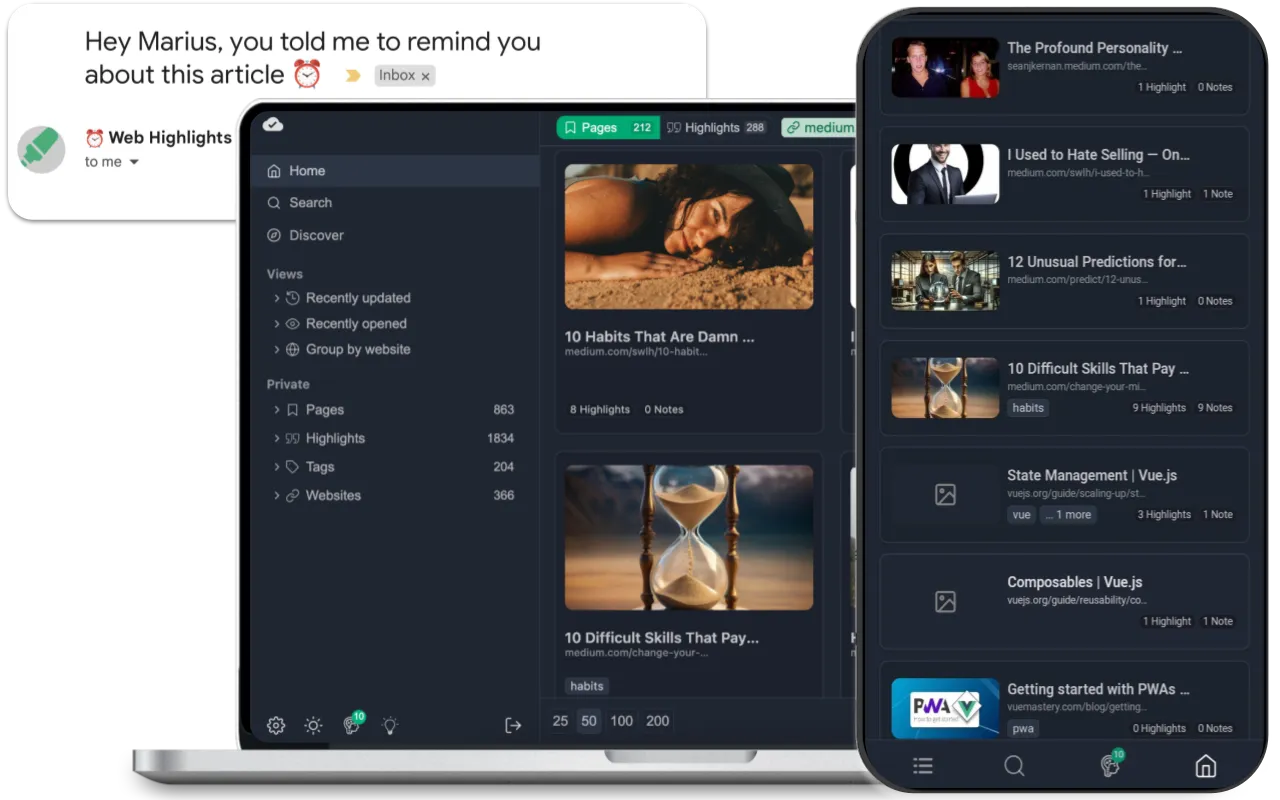
Discover Web Highlights- Your Ultimate PDF & Web Highlighter
In the digital age, information is abundant, but finding and organizing that information can be a daunting task. Enter Web Highlights, a powerful tool designed to streamline your research process by allowing you to highlight text on any web page or PDF. This innovative solution not only enhances your productivity but also ensures that you can easily access and organize your highlights whenever you need them. In this article, we will explore the features, benefits, and practical applications of Web Highlights, demonstrating how it can transform the way you manage information.
The Need for Efficient Information Management
With the vast amount of content available online, it’s easy to feel overwhelmed. Whether you’re a student, researcher, or professional, the ability to quickly find and reference important information is crucial. Traditional methods of bookmarking or saving links often fall short, as they do not allow for easy retrieval of specific content. This is where Web Highlights comes into play, offering a more effective way to manage your digital research.
The Problem with Traditional Methods
Many individuals rely on methods such as:
- Bookmarking: While bookmarking can save links, it doesn’t help you remember why you saved a particular page or what information was important.
- Copying and Pasting: This method can be time-consuming and often leads to disorganized notes scattered across different documents.
- Browser History: Searching through browser history can be tedious and inefficient, especially if you visit numerous pages daily.
These traditional methods can hinder productivity and make it challenging to keep track of valuable information. Web Highlights addresses these issues by providing a more intuitive and organized approach to information management.
Key Features of Web Highlights
Web Highlights offers a range of features designed to enhance your research experience. Here’s a closer look at what makes this tool stand out:
Highlighting on Any Web Page or PDF
One of the primary features of Web Highlights is its ability to highlight text on any web page or PDF document. This functionality allows users to:
- Select and Highlight: Simply select the text you want to highlight, and it will be saved directly to your Web Highlights account.
- Color-Coded Highlights: Use different colors to categorize your highlights, making it easier to organize and retrieve information later.
Direct Syncing to the Web App
Web Highlights automatically syncs your highlights to the web app, ensuring that your notes are always accessible. This feature provides several advantages:
- Cross-Device Access: Whether you’re on your laptop, tablet, or smartphone, you can access your highlights from any device with an internet connection.
- Real-Time Updates: Any changes you make, such as adding new highlights or editing existing ones, are instantly reflected across all devices.
Organized Research
With Web Highlights, you can keep your research organized in a way that makes sense to you. The tool allows you to:
- Create Folders: Organize your highlights into folders based on topics, projects, or any other criteria that suits your needs.
- Search Functionality: Quickly find specific highlights using the search feature, saving you time and effort when you need to reference information.
Collaboration Features
For teams and groups working on projects, Web Highlights offers collaboration features that enhance teamwork:
- Share Highlights: Easily share your highlights with colleagues or classmates, facilitating group discussions and collaborative research.
- Commenting: Add comments to specific highlights, allowing for deeper discussions and insights on the material.
User-Friendly Interface
Web Highlights boasts a clean and intuitive interface that makes it easy for users to navigate and utilize its features. Key aspects include:
- Simple Navigation: The layout is designed for ease of use, allowing users to quickly find their highlights and organize them effectively.
- Customization Options: Users can customize their experience by adjusting settings to fit their preferences.
Benefits of Using Web Highlights
The advantages of using Web Highlights extend beyond its features. Here are some key benefits that make it a valuable tool for anyone who regularly engages with online content:
Improved Productivity
By allowing users to highlight and organize information efficiently, Web Highlights significantly boosts productivity. You can spend less time searching for information and more time focusing on your work.
Enhanced Retention
Highlighting important information helps reinforce learning and retention. By actively engaging with the material, users are more likely to remember key concepts and details.
Streamlined Research Process
Web Highlights simplifies the research process by providing a centralized location for all your highlights. This organization makes it easier to compile information for reports, essays, or presentations.
Reduced Stress
With a reliable system for managing information, users can reduce the stress associated with research. Knowing that you can easily find and reference important highlights can lead to a more relaxed and focused study or work environment.
How to Get Started with Web Highlights
Getting started with Web Highlights is a straightforward process. Follow these steps to begin enhancing your research experience:
Sign Up for an Account: Visit the Web Highlights websiteand create a free account. The platform offers various subscription options, including a free tier with essential features.
Install the Browser Extension: To enable highlighting on web pages, install the Web Highlights browser extension. This extension is compatible with popular browsers like Chrome, Firefox, and Safari.
Start Highlighting: Once the extension is installed, navigate to any web page or PDF document. Simply select the text you want to highlight, and it will be saved to your account.
Organize Your Highlights: Use folders and color-coded highlights to organize your research. Take advantage of the search functionality to quickly find specific information.
Collaborate with Others: If you’re working on a group project, invite team members to share highlights and collaborate effectively.
Frequently Asked Questions
Is Web Highlights free to use?
Web Highlights offers a free tier with essential features. There are also premium plans available that provide additional functionalities for advanced users.
Can I use Web Highlights on mobile devices?
Yes, Web Highlights is accessible on various devices, including smartphones and tablets, allowing for flexible research on the go.
How does Web Highlights compare to other highlighting tools?
Web Highlights stands out due to its seamless integration with both web pages and PDFs, as well as its organizational features. While other tools may focus on one aspect, Web Highlights combines multiple functionalities for a comprehensive research experience.
Can I share my highlights with others?
Yes, Web Highlights allows users to share their highlights with others, making it easy to collaborate on projects and discussions.
Is my data secure with Web Highlights?
Web Highlights takes user privacy and data security seriously. Your highlights are stored securely, and you can manage your account settings to control your data.
Transform Your Research Experience Today
In a world where information is constantly at our fingertips, having the right tools to manage that information is essential. Web Highlights offers a unique solution that allows users to highlight, organize, and access important information effortlessly.
