
What is HEY? Transforming Email into a Delightful Experience
For years, email has been a necessary but often frustrating part of our digital lives. The cluttered inboxes, endless spam, and overwhelming notifications have made email feel more like a chore than a tool for communication. Enter HEY, a revolutionary email service that aims to change the way we interact with our inboxes. With its fresh approach, HEY transforms email into something you want to use, not something you’re forced to deal with. In this article, we’ll explore what HEY is, its unique features, and how it can enhance your email experience.
The Evolution of Email
Email has been around since the early days of the internet, serving as a primary means of communication for both personal and professional use. However, as the volume of emails has increased, so have the challenges associated with managing them. Here are some common issues users face with traditional email services:
Overwhelming Clutter
Most email services present users with a never-ending stream of messages, making it difficult to find important emails amidst the noise.Spam and Unwanted Emails
Spam filters are not always effective, and users often find themselves inundated with promotional emails and unwanted messages.Lack of Organization
Traditional email interfaces often lack intuitive organization tools, leading to disorganized inboxes and missed messages.Time-Consuming Management
Sorting through emails, unsubscribing from lists, and managing notifications can be time-consuming and frustrating.
HEY addresses these pain points with a fresh perspective on email management, offering a solution that prioritizes user experience and efficiency.
What Makes HEY Different?
HEY is not just another email service; it’s a complete reimagining of how we interact with our inboxes. Here are some of the key features that set HEY apart from traditional email platforms:
1. The Screener
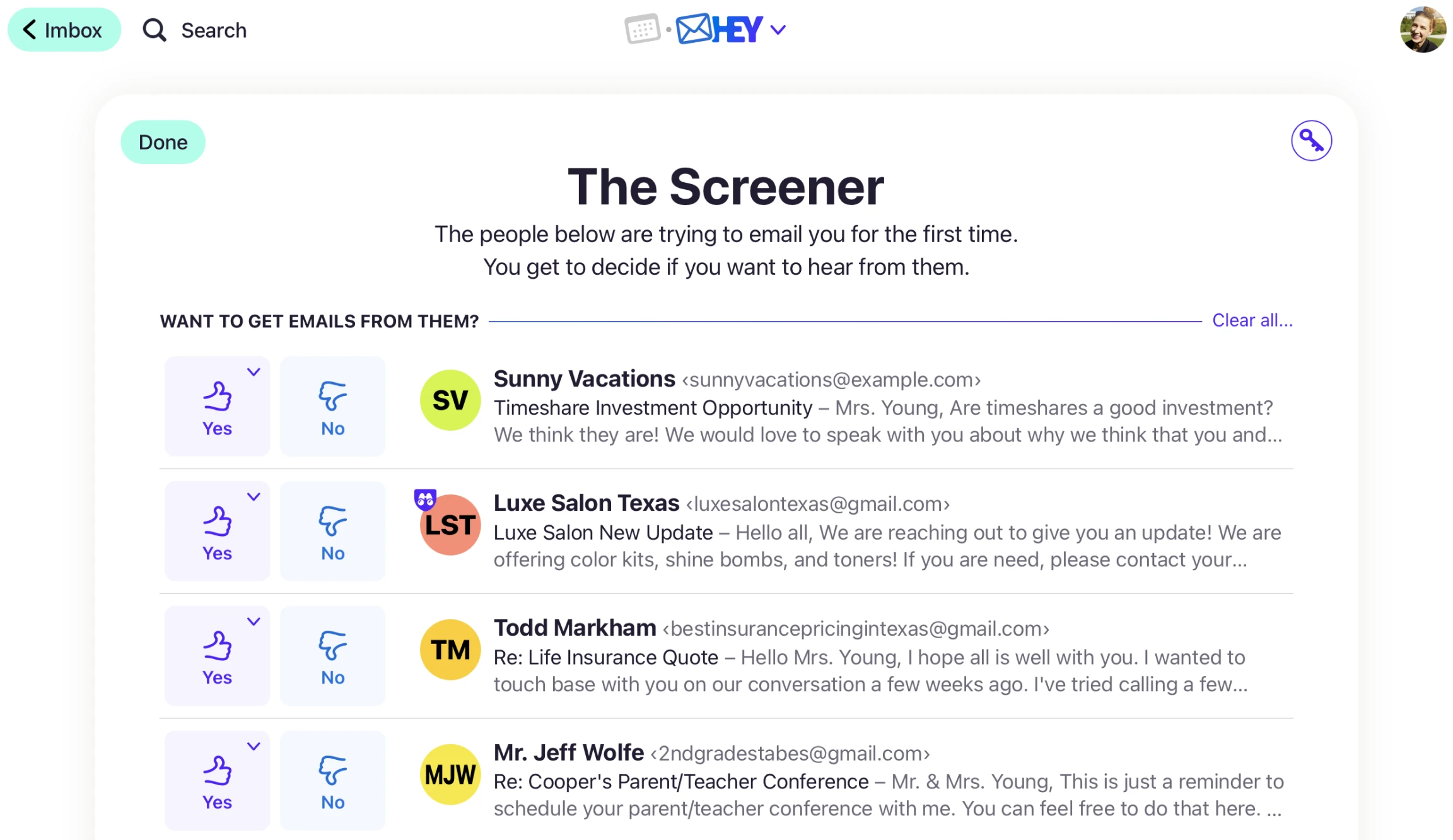
One of HEY’s standout features is the Screener, which allows users to control who can send them emails. When someone sends you an email for the first time, it goes to the Screener, where you can choose to accept or reject the sender. This feature helps eliminate unwanted emails and spam, ensuring that your inbox remains clutter-free.
2. The Focused Inbox
HEY introduces a Focused Inbox that prioritizes important emails while filtering out less relevant messages. This feature uses smart algorithms to learn your preferences over time, ensuring that you see the emails that matter most to you.
3. Built-In Reply Suggestions
To streamline communication, HEY offers built-in reply suggestions. When you receive an email, HEY analyzes the content and provides quick response options, allowing you to reply faster without having to type out a full message.
4. The Feed
Instead of a traditional inbox, HEY features a Feed that organizes your emails in a visually appealing way. This layout makes it easier to scan through messages and find what you need quickly.
5. Privacy and Security
HEY places a strong emphasis on user privacy. The service automatically blocks tracking pixels in emails, preventing senders from knowing when you open their messages. This feature enhances your privacy and gives you more control over your email interactions.
6. Email Aliases
With HEY, you can create email aliases for different purposes. This feature allows you to manage your communications more effectively by using different addresses for various contexts, such as shopping, newsletters, or personal correspondence.
How HEY Enhances Your Email Experience
By addressing the common pain points associated with traditional email services, HEY enhances the overall email experience in several ways:
1. Reduced Clutter
With the Screener and Focused Inbox features, HEY significantly reduces the clutter in your inbox. You can focus on the emails that matter most without being distracted by spam or promotional messages.
2. Increased Productivity
The built-in reply suggestions and organized Feed layout streamline your email management, allowing you to respond to messages more quickly and efficiently. This increased productivity can save you valuable time throughout your day.
3. Enhanced Control
HEY gives you greater control over your email interactions. With features like the Screener and email aliases, you can manage who can contact you and how you communicate with different groups.
4. Improved Privacy
By blocking tracking pixels and prioritizing user privacy, HEY ensures that your email interactions remain confidential. This focus on privacy is increasingly important in today’s digital landscape.
Getting Started with HEY
If you’re ready to transform your email experience with HEY, getting started is simple. Here’s how to set up your HEY account:
Visit the HEY Website
Go to HEY.comto learn more about the service and sign up for an account.Create Your Account
Follow the prompts to create your HEY account. You’ll need to provide some basic information and choose your email address.Explore the Features
Once your account is set up, take some time to explore HEY’s unique features. Familiarize yourself with the Screener, Focused Inbox, and other tools that will enhance your email experience.Customize Your Settings
HEY allows you to customize various settings to suit your preferences. Adjust your notification settings, manage your aliases, and set up your Screener to filter emails effectively.Start Using HEY
With everything set up, you can start using HEY to manage your emails more efficiently and enjoy a clutter-free inbox.
Use Cases for HEY
HEY is suitable for a wide range of users, including:
- Busy Professionals: Streamline your email management and focus on important communications without the distraction of spam.
- Frequent Online Shoppers: Use email aliases to manage shopping confirmations and promotional emails separately from your personal correspondence.
- Content Creators: Organize communications with brands, collaborators, and followers using HEY’s unique features.
- Privacy-Conscious Users: Protect your privacy with HEY’s tracking pixel blocking and enhanced security features.
No matter your role, HEY provides the tools you need to enhance your email experience.
FAQs About HEY
1. Is HEY free?
HEY offers a subscription-based model. While there may be a trial period, continued use requires a monthly or annual fee.
2. Can I use HEY with my existing email address?
Yes, HEY allows you to import your existing email accounts, making it easy to transition to the new platform.
3. How does the Screener work?
The Screener allows you to control who can send you emails. When someone emails you for the first time, you can choose to accept or reject their message.
4. Is HEY secure?
Yes, HEY prioritizes user privacy and security by blocking tracking pixels and providing features that enhance your control over email interactions.
Conclusion: Embrace a New Era of Email with HEY
Email doesn’t have to be a burden. With HEY’s innovative approach, you can transform your email experience into something enjoyable and efficient. By addressing the common pain points associated with traditional email services, HEY empowers users to take control of their inboxes and focus on what truly matters. If you’re tired of dealing with cluttered inboxes and unwanted emails, it’s time to give HEY a try and discover a fresh perspective on email management.
