
Discover JetBrains- Powerful IDEs and Collaboration Tools for Developers
In the fast-paced world of software development, having the right tools can make all the difference. JetBrains is a leading software development company known for its powerful Integrated Development Environments (IDEs) and tools that cater to a wide range of programming languages and technologies. With a focus on enhancing developer productivity and collaboration, JetBrains has become a go-to choice for developers around the globe. In this article, we will explore what JetBrains is, the various products it offers, and how these tools can benefit developers and teams.
Understanding JetBrains
Founded in 2000, JetBrains has established itself as a pioneer in the development of intelligent software tools. The company’s mission is to create tools that help developers be more productive and efficient in their work. JetBrains is best known for its IDEs, which provide a rich set of features designed to streamline the development process, from writing code to debugging and testing.
Key Features of JetBrains IDEs
JetBrains offers a variety of IDEs tailored to different programming languages and technologies. Here are some of the key features that make JetBrains IDEs stand out:
Smart Code Completion: JetBrains IDEs provide intelligent code completion suggestions based on the context of the code being written. This feature helps developers write code faster and with fewer errors.
Refactoring Tools: JetBrains IDEs come equipped with powerful refactoring tools that allow developers to restructure their code without changing its external behavior. This capability is essential for maintaining clean and efficient codebases.
Integrated Version Control: JetBrains IDEs support integration with popular version control systems like Git, allowing developers to manage their code repositories directly within the IDE. This integration simplifies the workflow and enhances collaboration among team members.
Built-in Debugger: Each JetBrains IDE includes a robust debugging tool that helps developers identify and fix issues in their code. The debugger provides features like breakpoints, step-through execution, and variable inspection, making it easier to troubleshoot problems.
Customizable User Interface: JetBrains IDEs offer a highly customizable user interface, allowing developers to tailor their workspace to suit their preferences. This flexibility enhances the overall user experience and productivity.
Extensive Plugin Ecosystem: JetBrains IDEs support a wide range of plugins that extend their functionality. Developers can easily add new features and tools to their IDEs, making them even more powerful.
JetBrains Products Overview
JetBrains offers a comprehensive suite of products designed to meet the needs of developers across various programming languages and technologies. Here are some of the most popular JetBrains IDEs and tools:
1. IntelliJ IDEA
IntelliJ IDEA is one of JetBrains’ flagship products and is widely regarded as one of the best IDEs for Java development. It provides advanced code assistance, support for various frameworks (such as Spring and Hibernate), and seamless integration with build tools like Maven and Gradle. IntelliJ IDEA also supports other languages, including Kotlin, Groovy, and Scala.
2. PyCharm
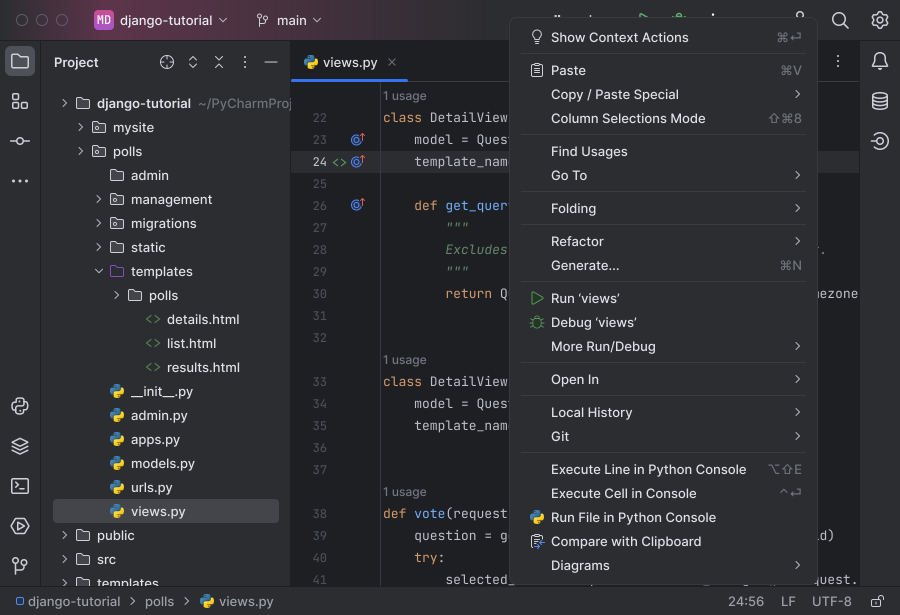
PyCharm is a powerful IDE specifically designed for Python development. It offers features like intelligent code completion, code inspections, and a built-in terminal. PyCharm also supports web development with frameworks like Django and Flask, making it a versatile choice for Python developers.
3. WebStorm
WebStorm is JetBrains’ IDE for JavaScript and web development. It provides support for modern frameworks like React, Angular, and Vue.js, along with features like code refactoring, debugging, and testing tools. WebStorm is an excellent choice for front-end developers looking to enhance their productivity.
4. PhpStorm
PhpStorm is a specialized IDE for PHP development. It offers features like code completion, debugging, and support for popular frameworks such as Laravel and Symfony. PhpStorm also includes tools for front-end development, making it a comprehensive solution for full-stack PHP developers.
5. RubyMine
RubyMine is JetBrains’ IDE for Ruby and Ruby on Rails development. It provides intelligent code assistance, debugging tools, and support for testing frameworks like RSpec and Minitest. RubyMine is designed to help Ruby developers write clean and efficient code.
6. Rider
Rider is a cross-platform IDE for .NET development. It combines the power of ReSharper (a popular productivity extension for Visual Studio) with a rich IDE experience. Rider supports various .NET frameworks, including ASP.NET, Xamarin, and Unity, making it a versatile choice for .NET developers.
7. TeamCity
TeamCity is JetBrains’ continuous integration and continuous deployment (CI/CD) server. It helps teams automate their build and deployment processes, ensuring that code changes are tested and deployed efficiently. TeamCity integrates seamlessly with JetBrains IDEs, providing a cohesive development experience.
8. YouTrack
YouTrack is an issue tracker designed for development teams. It allows teams to manage tasks, track bugs, and plan sprints effectively. YouTrack integrates with JetBrains IDEs, enabling developers to create and manage issues directly from their development environment.
Benefits of Using JetBrains Tools
The advantages of using JetBrains tools extend beyond just enhanced productivity. Here are some key benefits that developers and teams can expect:
Increased Productivity
JetBrains IDEs are designed to streamline the development process, allowing developers to write code faster and with fewer errors. Features like smart code completion, refactoring tools, and integrated version control help developers focus on what matters most: building high-quality software.
Improved Code Quality
With built-in code inspections and refactoring tools, JetBrains IDEs help developers maintain clean and efficient codebases. This focus on code quality reduces the likelihood of bugs and issues in production, leading to more reliable software.
Seamless Collaboration
JetBrains tools facilitate collaboration among team members by providing integrated version control and issue tracking. Developers can easily share code, manage tasks, and communicate effectively, regardless of their physical location.
Cross-Platform Support
Many JetBrains IDEs are cross-platform, allowing developers to work on their projects regardless of their operating system. This flexibility is particularly beneficial for teams with diverse development environments.
Extensive Learning Resources
JetBrains provides a wealth of learning resources, including documentation, tutorials, and community forums. These resources help developers get the most out of their tools and improve their skills over time.
Use Cases for JetBrains Tools
JetBrains tools are versatile and can be applied across various industries and functions. Here are some common use cases:
Software Development
JetBrains IDEs are widely used in software development across various programming languages. Their powerful features and integrations make them ideal for building applications, websites, and services.
Web Development
Web developers can leverage JetBrains tools like WebStorm and PhpStorm to enhance their productivity and streamline their workflows. These IDEs provide support for modern web technologies and frameworks, making it easier to build responsive and dynamic web applications.
Data Science and Machine Learning
With support for Python and R, JetBrains IDEs like PyCharm can be used for data science and machine learning projects. Developers can take advantage of intelligent code assistance and integrated tools for data analysis and visualization.
Game Development
JetBrains Rider is a popular choice for game developers working with Unity and other game engines. Its powerful features and support for C# make it an excellent tool for building games and interactive experiences.
Getting Started with JetBrains
If you’re ready to enhance your development workflow with JetBrains tools, getting started is easy. Here’s a step-by-step guide:
Choose Your IDE: Visit the JetBrains website and explore the various IDEs available. Choose the one that best fits your programming language and development needs.
Download and Install: Download the IDE and follow the installation instructions. JetBrains offers free trials for most of its products, allowing you to test them before committing.
Set Up Your Project: Create a new project or import an existing one. JetBrains IDEs provide templates and wizards to help you get started quickly.
Explore Features: Familiarize yourself with the IDE’s features, such as code completion, refactoring tools, and integrated version control. Take advantage of the learning resources available on the JetBrains website.
Collaborate with Your Team: If you’re working in a team, set up version control and issue tracking to facilitate collaboration. JetBrains tools integrate seamlessly with popular version control systems like Git.
Frequently Asked Questions
What is JetBrains?
JetBrains is a software development company known for its powerful IDEs and tools that enhance developer productivity and collaboration across various programming languages and technologies.
Which programming languages do JetBrains IDEs support?
JetBrains offers IDEs for a wide range of programming languages, including Java, Python, JavaScript, PHP, Ruby, C#, and more.
Are JetBrains IDEs free to use?
JetBrains offers free trials for most of its products, but many IDEs require a paid license for continued use. However, JetBrains also provides free versions for educational purposes and open-source projects.
Can I integrate JetBrains IDEs with version control systems?
Yes, JetBrains IDEs support integration with popular version control systems like Git, allowing developers to manage their code repositories directly within the IDE.
What is TeamCity?
TeamCity is JetBrains’ continuous integration and continuous deployment (CI/CD) server that helps teams automate their build and deployment processes.
Final Thoughts
JetBrains is transforming the way developers work by providing powerful IDEs and collaboration tools that enhance productivity and streamline workflows. With a focus on intelligent code assistance, seamless collaboration, and extensive integrations, JetBrains has become a trusted choice for developers around the world. If you’re looking to elevate your development experience and improve your team’s efficiency, JetBrains tools are the solution you need.
