
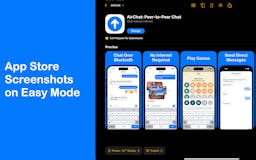
What is Picasso? Optimize App Store Screenshots for Higher Conversions
In the competitive world of app development, standing out in the App Store is no small feat. With millions of apps vying for attention, your product page needs to make an immediate impact. That’s where Picasso comes in—a powerful App Store screenshot editor designed to help you optimize your screenshots, localize them effortlessly, and streamline your workflow. By using Picasso, you can increase your product page conversion rates by up to 30%, giving your app the edge it needs to succeed.
Why App Store Screenshots Matter
When potential users browse the App Store, your screenshots are often the first thing they notice. These visuals play a critical role in shaping their first impression of your app. Here’s why they matter:
- First Impressions Count: Users spend only a few seconds deciding whether to download an app. High-quality screenshots can grab their attention instantly.
- Showcase Features: Screenshots provide a quick overview of your app’s functionality and benefits.
- Drive Conversions: Well-designed screenshots can persuade users to hit the download button, directly impacting your app’s success.
With Picasso, you can create stunning, professional screenshots that not only look great but also drive results.
Key Features of Picasso
Picasso is more than just a screenshot editor—it’s a comprehensive tool designed to simplify and enhance your App Store optimization (ASO) efforts. Let’s explore its standout features:
1. Powerful Screenshot Editor
Picasso’s screenshot editor is at the heart of its functionality. It allows you to create visually appealing screenshots that highlight your app’s best features. With this tool, you can:
- Choose from a variety of pre-designed templates.
- Customize layouts, colors, and fonts to match your app’s branding.
- Add device frames to showcase your app in action.
This feature ensures that your screenshots look polished and professional, helping you stand out in a crowded marketplace.
2. Localization Made Easy with String Catalogs
Reaching a global audience is essential for app success, and localization is a key part of that strategy. Picasso simplifies the localization process with its String Catalogs feature. Here’s how it works:
- Import your app’s text strings into Picasso.
- Translate them into multiple languages.
- Automatically apply the translations to your screenshots.
By localizing your screenshots, you can connect with users in different regions and increase your app’s appeal worldwide.
3. Direct Upload to App Store Connect
Once your screenshots are ready, Picasso allows you to upload them directly to App Store Connect. This seamless integration saves you time and eliminates the hassle of manually uploading files. With just a few clicks, your screenshots are live and ready to impress potential users.
4. Streamlined Workflow for Teams
Picasso is designed with collaboration in mind. Its intuitive interface and team-friendly features make it easy for developers, designers, and marketers to work together. You can:
- Share projects with team members.
- Collaborate in real-time.
- Keep everyone on the same page throughout the design process.
This streamlined workflow ensures that your team can create and publish high-quality screenshots efficiently.
5. Data-Driven Optimization
Picasso doesn’t just help you create beautiful screenshots—it also provides insights to optimize them. By analyzing user behavior and conversion rates, you can identify what works and make data-driven decisions to improve your product page performance.
How to Use Picasso to Boost Your App Store Conversions
Getting started with Picasso is simple. Here’s a step-by-step guide to help you make the most of this powerful tool:
- Sign Up and Log In: Create an account on Picasso’s website and log in to access the dashboard.
- Import Your App Details: Upload your app’s assets, including text strings and images.
- Choose a Template: Select a template that fits your app’s style and branding.
- Customize Your Screenshots: Add text, adjust colors, and apply device frames to create eye-catching visuals.
- Localize Your Content: Use the String Catalogs feature to translate your screenshots into multiple languages.
- Upload to App Store Connect: Once your screenshots are finalized, upload them directly to the App Store.
By following these steps, you can create professional-quality screenshots that drive conversions and set your app apart from the competition.
Who Can Benefit from Picasso?
Picasso is a versatile tool that caters to a wide range of users in the app development ecosystem. Here’s who can benefit the most:
- App Developers: Save time and focus on coding while Picasso handles your screenshot design.
- Marketers: Create compelling visuals that align with your app’s branding and marketing strategy.
- Designers: Streamline the design process with Picasso’s intuitive tools and templates.
- ASO Specialists: Optimize screenshots for better visibility and higher conversion rates.
No matter your role, Picasso can help you achieve your goals and maximize your app’s potential.
FAQs About Picasso
What platforms does Picasso support?
Picasso is designed specifically for apps on the Apple App Store. However, its features can also be adapted for use with other platforms, such as Google Play.
Is Picasso beginner-friendly?
Yes! Picasso’s user-friendly interface makes it easy for beginners to create professional-quality screenshots without any prior design experience.
Can I use Picasso for free?
Picasso offers a free trial, allowing you to explore its features before committing to a subscription. Visit their pricing page for more details.
How does Picasso improve conversion rates?
By providing tools to create visually appealing, localized, and optimized screenshots, Picasso helps you attract more users and increase downloads.
Why You Should Try Picasso Today
If you’re serious about improving your app’s performance on the App Store, Picasso is a tool you can’t afford to ignore. Its powerful screenshot editor, localization features, and seamless integration with App Store Connect make it an essential part of any app developer’s toolkit. Don’t miss out on the opportunity to boost your conversions and take your app to the next level.
