
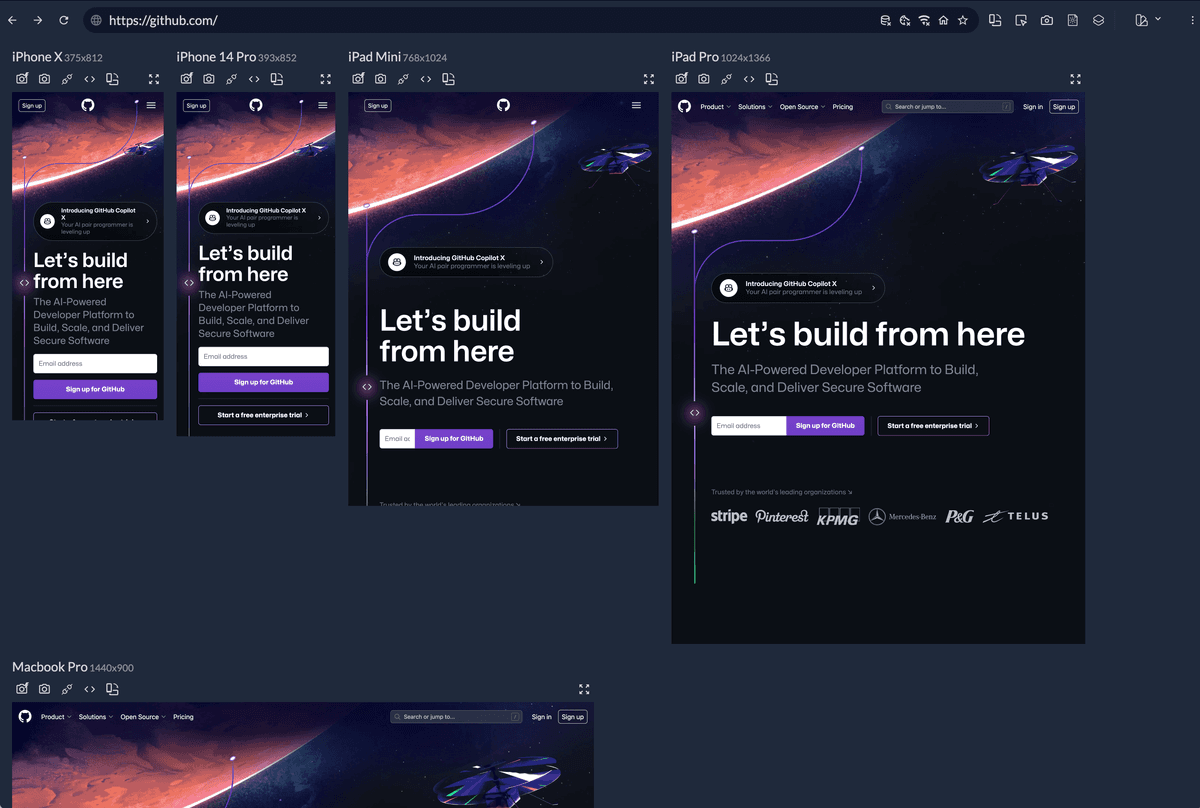
What is Responsively? The Ultimate Browser for Responsive Web Development
In the fast-paced world of web development, creating responsive web applications that function seamlessly across various devices is crucial. Enter Responsively, a specialized web browser designed to streamline the development process for responsive web applications. With its unique features, Responsively allows developers to preview all target screens side-by-side in a single window, significantly reducing development time and enhancing productivity. This article explores the key features, benefits, and overall impact of Responsively on the web development landscape.
The Need for Responsively
As the number of devices and screen sizes continues to grow, developers face the challenge of ensuring their web applications look and function well on all platforms. Traditional browsers often require developers to switch between multiple tabs or devices to test their applications, leading to inefficiencies and increased development time. Responsively addresses these challenges by providing a dedicated environment for responsive web app development.
Key Challenges in Responsive Web Development
- Multiple Device Testing: Developers often need to test their applications on various devices, which can be time-consuming and cumbersome.
- Inefficient Workflows: Switching between different browsers and devices can disrupt the development flow, leading to frustration and decreased productivity.
- Learning Curves: Many development tools come with steep learning curves, making it difficult for developers to adapt quickly.
What Makes Responsively Unique?
Side-by-Side Screen Previews
One of the standout features of Responsively is its ability to display multiple screen previews side-by-side in a single window. This functionality allows developers to:
- Simultaneous Testing: View how a web application appears on different devices, such as smartphones, tablets, and desktops, all at once.
- Real-Time Updates: As developers make changes to their code, they can instantly see the effects on all target screens, facilitating a more efficient workflow.
Familiar Development Tools
Responsively leverages the familiar development tools that many developers already use, eliminating the need for additional learning. Key aspects include:
- Built-In Dev Tools: Responsively integrates with existing browser developer tools, allowing developers to inspect elements, debug, and modify styles without having to learn a new interface.
- Customizable Layouts: Developers can customize the layout of their screen previews, adjusting the size and arrangement to suit their workflow.
Enhanced Development Speed
By streamlining the testing process and reducing the need for constant switching between devices, Responsively significantly cuts down development time. Benefits include:
- Faster Iteration: Developers can quickly iterate on their designs, making adjustments and immediately seeing the results across all target screens.
- Improved Collaboration: Teams can work together more effectively, as everyone can view the same screen previews in real-time, facilitating discussions and feedback.
Key Features of Responsively
Responsive Design Mode
Responsively’s responsive design mode allows developers to test their applications in various screen sizes and orientations. This feature includes:
- Predefined Device Sizes: Users can select from a list of common device sizes or create custom dimensions to test their applications.
- Orientation Switching: Easily switch between portrait and landscape orientations to see how your application adapts to different layouts.
Live Reloading
Responsively supports live reloading, which means that any changes made to the code are automatically reflected in the preview screens. This feature enhances the development experience by:
- Instant Feedback: Developers receive immediate feedback on their changes, allowing for quicker adjustments and refinements.
- Reduced Testing Time: The need to manually refresh the browser is eliminated, saving valuable time during the development process.
Multi-Device Synchronization
Responsively allows for multi-device synchronization, enabling developers to interact with all preview screens simultaneously. This feature includes:
- Unified Scrolling: When scrolling on one screen, all other screens scroll in sync, making it easier to compare layouts and functionality.
- Click and Interact: Developers can click and interact with elements on one screen, and the same actions will be mirrored across all other screens, providing a comprehensive testing experience.
Custom User Agents
Responsively allows developers to set custom user agents for each preview screen. This feature is particularly useful for:
- Testing Specific Behaviors: Developers can simulate how their applications behave on different browsers and devices, ensuring compatibility and performance.
- Debugging Issues: By testing with various user agents, developers can identify and resolve issues that may arise on specific platforms.
The Benefits of Using Responsively
Increased Productivity
By providing a dedicated environment for responsive web development, Responsively helps developers work more efficiently. Key productivity benefits include:
- Streamlined Workflows: The ability to view multiple screens simultaneously reduces the time spent switching between devices and browsers.
- Faster Development Cycles: With real-time updates and live reloading, developers can iterate quickly, leading to shorter development cycles.
Enhanced Collaboration
Responsively fosters collaboration among development teams by providing a shared environment for testing and feedback. Benefits include:
- Real-Time Collaboration: Team members can view the same screen previews, making it easier to discuss changes and gather feedback.
- Improved Communication: The ability to see changes in real-time reduces misunderstandings and enhances communication within the team.
Cost-Effective Solution
By reducing development time and improving efficiency, Responsively can lead to cost savings for businesses. Key financial benefits include:
- Lower Development Costs: Faster development cycles mean that projects can be completed more quickly, reducing labor costs.
- Increased ROI: By delivering high-quality, responsive applications faster, businesses can improve their return on investment.
Getting Started with Responsively
Installation and Setup
Getting started with Responsively is straightforward. Here’s how to install and set up the browser:
- Download Responsively: Visit the official website and download the latest version of Responsively for your operating system.
- Install the Application: Follow the installation instructions to set up Responsively on your device.
- Launch Responsively: Open the application and start creating your workspaces for responsive web development.
Tips for Maximizing Responsively
To get the most out of Responsively, consider the following tips:
- Utilize Custom Layouts: Experiment with different screen layouts to find the configuration that works best for your workflow.
- Take Advantage of Live Reloading: Make changes to your code and observe the results in real-time to streamline your development process.
- Collaborate with Your Team: Use Responsively’s multi-device synchronization features to enhance collaboration and communication within your team.
Frequently Asked Questions
Q: Is Responsively free to use?
A: Yes, Responsively is an open-source project and is free to download and use.
Q: Can I use Responsively on multiple devices?
A: Responsively is primarily designed for desktop use, but you can test how your applications appear on various devices through its multi-screen functionality.
Q: How does Responsively compare to other development tools?
A: Responsively is specifically tailored for responsive web development, offering unique features like side-by-side screen previews and live reloading that set it apart from traditional browsers.
Q: Is there a learning curve for using Responsively?
A: No, Responsively is designed to be user-friendly, leveraging familiar development tools to minimize the learning curve for developers.
Experience the Responsively Advantage
Responsively is a game-changer for web developers focused on creating responsive applications. By providing a dedicated environment for testing and development, it streamlines workflows, enhances collaboration, and ultimately leads to faster, more efficient development cycles.
