
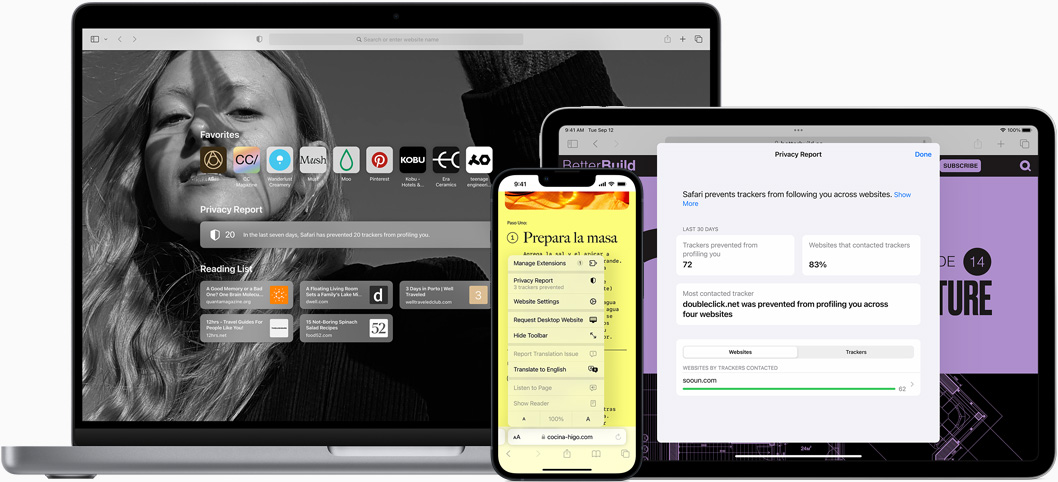
What is Safari? The Best Browser for Mac, iPhone, and iPad
Safari is more than just a web browser; it’s a powerful tool designed specifically for Apple users. Built to enhance your browsing experience on Mac, iPhone, and iPad, Safari combines speed, efficiency, and robust privacy features. This article explores the key aspects of Safari, highlighting its unique features, advantages, and how it stands out in the crowded browser market.
The Evolution of Safari
Safari was first introduced by Apple in 2003 as a part of Mac OS X Panther. Since then, it has evolved significantly, incorporating advanced features and improvements that cater to the needs of modern users. With each iteration, Safari has focused on enhancing performance, security, and user experience, making it a preferred choice for millions of Apple device users.
Key Milestones in Safari’s Development
- 2003: Launch of Safari as the default browser for Mac OS X.
- 2010: Introduction of Safari 5, featuring the Reader mode for distraction-free reading.
- 2013: Safari 7 brought significant performance improvements and energy efficiency.
- 2020: Safari 14 introduced a redesigned interface, enhanced privacy features, and support for new web technologies.
Why Choose Safari?
Safari is designed with Apple users in mind, offering a seamless experience across all devices. Here are some compelling reasons to choose Safari as your primary browser:
Built-In Privacy Features
Privacy is a top priority for Apple, and Safari reflects this commitment. The browser includes several built-in privacy features that keep your browsing habits secure:
- Intelligent Tracking Prevention: This feature uses machine learning to identify and block trackers, ensuring that your online activities remain private.
- Privacy Report: Safari provides a detailed report of the trackers that have been blocked, giving you insight into your browsing privacy.
- Sandboxing: Each tab in Safari operates in its own sandbox, preventing malicious websites from accessing your data.
Speed and Efficiency
Safari is optimized for Apple hardware, making it one of the fastest browsers available. Its performance is particularly impressive on Mac, iPhone, and iPad, where it leverages the underlying architecture for speed and efficiency.
- Faster Page Loading: Safari loads web pages quickly, thanks to its efficient rendering engine.
- Energy Efficiency: Safari is designed to consume less power, extending battery life on portable devices. This is especially beneficial for users who rely on their iPhones and iPads throughout the day.
Seamless Integration with Apple Ecosystem
Safari is deeply integrated into the Apple ecosystem, providing a cohesive experience across devices. Here’s how it enhances your workflow:
- Handoff: Start browsing on one device and pick up right where you left off on another. Handoff allows you to switch between your Mac, iPhone, and iPad effortlessly.
- iCloud Tabs: Access your open tabs across all your devices with iCloud Tabs. This feature ensures that you can continue your browsing session no matter which device you’re using.
- Apple Pay: Safari supports Apple Pay, allowing you to make secure purchases online without having to enter your payment information repeatedly.
Features That Enhance Your Browsing Experience
Safari is packed with features that make browsing more enjoyable and efficient. Here are some of the standout tools and functionalities:
Smart Search Field
The Smart Search Field in Safari combines the address bar and search bar into one, making it easy to enter URLs or search queries. It also provides suggestions based on your browsing history and bookmarks, helping you find what you need quickly.
Reader Mode
Safari’s Reader mode strips away ads and other distractions, allowing you to focus on the content. This feature is particularly useful for reading articles, as it presents text in a clean, easy-to-read format.
Tab Management
Managing multiple tabs in Safari is straightforward. You can easily organize tabs into groups, making it simple to switch between different projects or topics. The new tab overview feature provides a visual representation of all open tabs, allowing for quick navigation.
Extensions and Customization
Safari supports a variety of extensions that enhance its functionality. From ad blockers to productivity tools, you can customize your browsing experience to suit your needs. The Extensions Gallery in the App Store makes it easy to find and install new tools.
Security Features You Can Trust
Safari prioritizes user security with a range of features designed to protect your data:
Password Management
Safari includes a built-in password manager that securely stores your passwords and generates strong, unique passwords for new accounts. This feature syncs across all your devices via iCloud, ensuring you always have access to your credentials.
Secure Browsing
When you visit a website, Safari checks for security certificates to ensure that the site is safe. If a site is deemed unsafe, Safari will warn you before you proceed, helping to protect you from phishing attacks and malware.
Privacy Settings
Safari allows users to customize their privacy settings, giving you control over how your data is shared. You can block cookies, prevent cross-site tracking, and manage your location settings to enhance your privacy while browsing.
The Future of Safari
As technology continues to evolve, so does Safari. Apple is committed to enhancing the browser with new features and improvements. Upcoming updates may include:
- Enhanced Privacy Features: Continued focus on user privacy with more advanced tracking prevention tools.
- Improved Performance: Ongoing optimizations to ensure Safari remains one of the fastest browsers available.
- New Web Technologies: Support for emerging web standards to enhance compatibility and performance.
Frequently Asked Questions
Q: Is Safari available on Windows?
A: Safari is primarily designed for Apple devices. While an older version was available for Windows, it is no longer supported. Users are encouraged to use Safari on Mac, iPhone, and iPad for the best experience.
Q: Can I use Safari on my iPhone and iPad?
A: Yes, Safari is the default browser on all iOS devices, providing a consistent experience across your iPhone and iPad.
Q: How does Safari compare to other browsers?
A: Safari is optimized for Apple devices, offering superior speed, energy efficiency, and privacy features compared to many other browsers.
Q: Does Safari support extensions?
A: Yes, Safari supports a variety of extensions that can enhance your browsing experience. You can find and install these extensions through the App Store.
Experience the Power of Safari
Safari is more than just a browser; it’s a powerful tool designed to enhance your online experience while prioritizing your privacy and security. With its seamless integration into the Apple ecosystem, speed, and efficiency, Safari stands out as the best choice for Mac, iPhone, and iPad users.
