
What is Toggl? The Essential Time Tracking App for Productivity
In today’s fast-paced work environment, effective time management is crucial for success. Enter Toggl, a powerful time tracking app designed to help individuals and teams monitor their time usage, improve productivity, and gain valuable insights into their work habits. Operated by Toggl OÜ and headquartered in Tallinn, Estonia, Toggl offers a comprehensive suite of online time tracking and reporting services through its website, as well as mobile and desktop applications.
The Importance of Time Tracking
Time tracking is more than just a way to log hours; it’s a vital tool for understanding how time is spent and identifying areas for improvement. Here are some key reasons why time tracking is essential:
- Increased Accountability: Tracking time helps individuals and teams stay accountable for their work, ensuring that tasks are completed efficiently.
- Better Project Management: By understanding how much time is spent on various tasks, project managers can allocate resources more effectively and set realistic deadlines.
- Enhanced Productivity: Time tracking can reveal patterns in work habits, helping users identify distractions and optimize their workflows.
- Accurate Billing: For freelancers and agencies, accurate time tracking is crucial for billing clients and ensuring that all hours worked are accounted for.
Key Features of Toggl
Toggl stands out in the crowded field of time tracking apps due to its user-friendly interface and robust feature set. Here are some of the key features that make Toggl a preferred choice for many professionals:
Simple Time Tracking
Toggl’s intuitive interface allows users to start tracking time with just a click. Users can create projects, assign tasks, and start the timer, making it easy to log hours without disrupting workflow.
Detailed Reporting
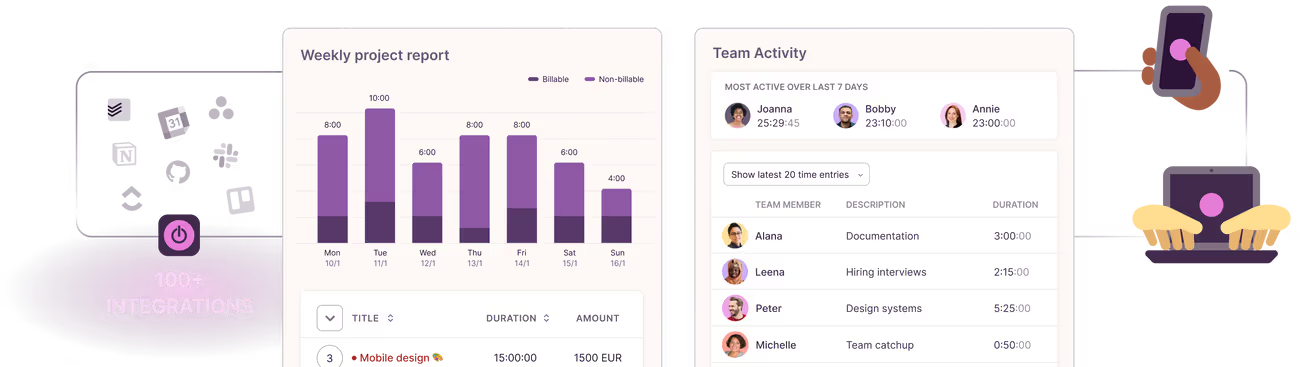
Toggl provides comprehensive reporting features that allow users to analyze their time usage. Users can generate reports based on projects, clients, or team members, providing valuable insights into productivity and resource allocation.
Cross-Platform Availability
Toggl is available on multiple platforms, including web, desktop (Windows, macOS), and mobile (iOS, Android). This cross-platform functionality ensures that users can track their time from anywhere, whether they are in the office or on the go.
Integrations
Toggl integrates seamlessly with a variety of other tools and applications, including project management software like Asana, Trello, and Jira, as well as communication tools like Slack. This integration capability enhances productivity by allowing users to track time without switching between applications.
Offline Tracking
One of Toggl’s standout features is its ability to track time offline. Users can log their hours even without an internet connection, and the data will sync automatically once they are back online.
Team Management
For teams, Toggl offers features that facilitate collaboration and oversight. Managers can invite team members, assign tasks, and monitor progress, making it easier to manage projects and ensure accountability.
How to Get Started with Toggl
Getting started with Toggl is straightforward. Here’s a step-by-step guide to help you set up your account and begin tracking your time effectively:
Step 1: Sign Up
Visit the Toggl websiteand sign up for a free account. You can choose to start with the free version, which offers essential features, or opt for a paid plan for more advanced functionalities.
Step 2: Set Up Your Workspace
Once you’ve created your account, set up your workspace. This includes adding your team members, creating projects, and defining tasks. A well-organized workspace will make time tracking more efficient.
Step 3: Start Tracking Time
To track time, simply click the “Start” button on the Toggl dashboard. You can enter the task name, select the project, and add any relevant tags. Toggl will begin tracking your time immediately.
Step 4: Review Your Reports
After tracking your time for a while, take advantage of Toggl’s reporting features. Review your time entries to identify patterns, assess productivity, and make informed decisions about your workflow.
Step 5: Adjust Your Workflow
Use the insights gained from your reports to adjust your workflow. Identify tasks that take longer than expected, eliminate distractions, and optimize your time management strategies.
Benefits of Using Toggl
Improved Time Management
By using Toggl, individuals and teams can gain a clearer understanding of how their time is spent. This insight allows for better time management and prioritization of tasks.
Enhanced Productivity
With the ability to track time accurately, users can identify time-wasting activities and focus on high-priority tasks. Toggl helps users stay on track and maintain productivity throughout the day.
Better Project Oversight
For project managers, Toggl provides valuable data on project timelines and resource allocation. This information is essential for making informed decisions and ensuring that projects stay on schedule.
Increased Accountability
Toggl fosters a culture of accountability within teams. By tracking time, team members can see how their contributions impact overall productivity, leading to a more engaged and motivated workforce.
Real-World Applications of Toggl
For Freelancers
Freelancers can benefit significantly from Toggl’s time tracking capabilities. By accurately logging hours worked on various projects, freelancers can ensure they bill clients correctly and maintain transparency in their work.
For Small Businesses
Small businesses can use Toggl to manage employee time effectively. By tracking hours worked on different projects, business owners can assess productivity, allocate resources, and make data-driven decisions.
For Large Teams
Larger teams can leverage Toggl’s team management features to monitor progress and ensure accountability. Managers can assign tasks, track team performance, and generate reports to assess overall productivity.
Frequently Asked Questions
Q: Is Toggl free to use?
A: Toggl offers a free version with essential features. Paid plans are available for users who need advanced functionalities.
Q: Can I use Toggl offline?
A: Yes, Toggl allows users to track time offline. Your data will sync automatically once you are back online.
Q: Does Toggl integrate with other tools?
A: Yes, Toggl integrates with various project management and communication tools, enhancing its functionality and usability.
Q: How does Toggl help with billing clients?
A: Toggl’s detailed reporting features allow freelancers and agencies to generate accurate invoices based on tracked hours, ensuring transparent billing.
Start Tracking Your Time with Toggl Today
Are you ready to take control of your time and boost your productivity? Toggl is here to help you track your hours, analyze your work habits, and achieve your goals. Don’t let time slip away; start using Toggl today to transform your time management practices!
